Déployer un centre de téléconsultation en zone rurale ou isolée : guide pratique
Déployer un centre de téléconsultation en zone rurale ou isolée, ce n'est pas ajouter de la visioconférence à un cabinet urbain. Les contraintes sont différentes : connexion instable, peu de personnel médical, spécialistes éloignés et, souvent, une infrastructure numérique réduite. Le projet doit en tenir compte dès le départ.
Ce guide s'appuie sur des déploiements MedConnect en Nouvelle-Calédonie, en Côte d'Ivoire, dans les déserts médicaux français, aux États-Unis et sur un programme de santé en Arabie saoudite (en cours). Environ 50 000 examens ont été enregistrés sur l'ensemble de ces terrains.
Pourquoi la télémédecine rurale est différente
En ville, on suppose un haut débit fiable, des spécialistes proches et des patients à l'aise avec le numérique. En zone rurale, aucune de ces hypothèses n'est garantie :
- Connectivité : débit intermittent, 4G seule ou coupures à certaines heures ; le satellite ajoute de la latence. Une plateforme qui exige un haut débit stable échouera.
- Personnel : les médecins manquent — c'est la raison d'être du projet. L'équipe sur place est le plus souvent infirmière ; le système doit être utilisable sans médecin présent.
- Infrastructure : pas de service informatique, pas de salle serveur, parfois pas de dossier patient informatisé. La solution doit être autonome.
- Énergie : l'alimentation peut être irrégulière. Appareils sur batterie et onduleur sont indispensables.
Les 4 questions d'infrastructure à trancher d'abord
1. Quelle connexion est disponible ?
Recensez les options (fibre, ADSL, 4G/5G, satellite) et mesurez le débit montant réel sur le site, à différentes heures. La téléconsultation en direct (synchrone) exige une connexion stable pour deux flux vidéo et les données des appareils. Si la connexion est faible ou intermittente, privilégiez le mode asynchrone : l'infirmier réalise l'examen, les données sont enregistrées puis transmises au médecin dès que la connexion le permet.
2. Déploiement temporaire ou permanent ?
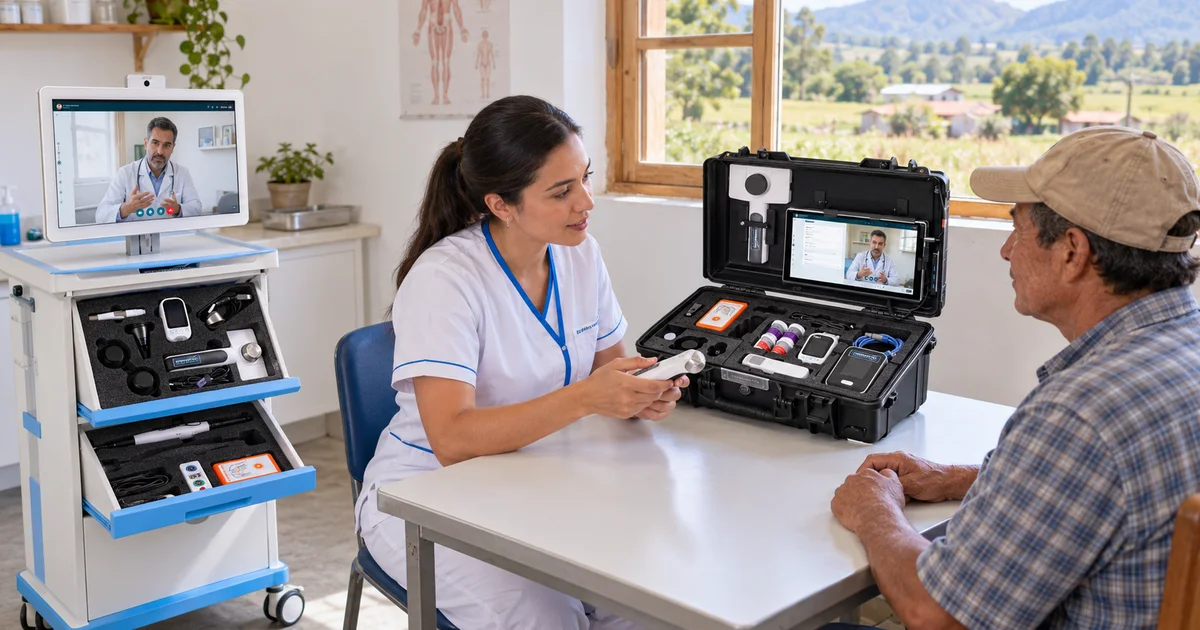
Un cabinet permanent justifie un chariot de télémédecine ou un poste fixe sur réseau filaire. Un dispositif mobile ou temporaire (tournées, campagnes saisonnières, unités mobiles) appelle une mallette de télémédecine transportable, sur batterie et réseau mobile.
3. Quel cadre réglementaire ?
Les exigences d'hébergement varient selon les pays. En France, les données de santé doivent être hébergées chez un hébergeur certifié HDS, ce qui est le cas de MedConnect (AWS, région de Paris). Pour les pays qui exigent que les données restent sur leur territoire, MedConnect propose aussi un déploiement on-premise, retenu pour le projet du Hajj en Arabie saoudite.
4. Quel périmètre clinique ?
Un point de dépistage de premier recours a besoin des constantes, de quelques examens de biologie délocalisée et d'un tri. Un pôle d'avis spécialisés a besoin d'ECG, d'échographie et d'imagerie haute résolution. Définissez le périmètre clinique avant de choisir les appareils.
Synchrone ou asynchrone
- Synchrone (en direct) : quand le débit le permet, l'infirmier et le médecin sont connectés en direct. Le médecin voit deux flux vidéo (patient et caméra d'examen), l'ECG et le son du stéthoscope en temps réel. C'est le mode privilégié pour les cas complexes.
- Asynchrone (télé-expertise différée) : quand la connexion est faible ou le volume élevé, l'infirmier enregistre l'examen et le médecin l'analyse plus tard. Au centre médical Dignité Sociale en Côte d'Ivoire, ce modèle permet de dépister environ 150 patients par jour.
Le format des données est le même dans les deux modes : le médecin consulte les mêmes tracés ECG, constantes et images.
Organisation : qui fait quoi sans médecin sur place
Le modèle infirmier est le socle de la télémédecine rurale : l'infirmier sur place manipule les appareils et réalise l'examen, le médecin à distance pose le diagnostic ou donne l'avis spécialisé. Un centre de téléconsultation d'un poste compte typiquement un infirmier formé par poste, une personne à l'accueil et un ou plusieurs médecins à distance, qui peuvent couvrir plusieurs sites. La capacité quotidienne dépend du type de consultation. Pour le cadre de la téléconsultation assistée par infirmier en France, voir la téléconsultation assistée.
Matériel : mallette, chariot ou sac
- Mallette de télémédecine : ECG, stéthoscope, dermatoscope, otoscope et moniteur de constantes dans une valise (~8 kg). Pour les visites à domicile, les unités mobiles et les déploiements temporaires. Voir la mallette.
- Chariot de télémédecine : poste fixe avec écran 21,5" et ensemble complet d'appareils, échographie comprise. Pour les cabinets permanents, MSP et EHPAD. Voir le chariot.
- Sac de télémédecine : l'option la plus légère (moins de 3 kg), pour le dépistage et le tri. Voir le sac.
Le projet du Hajj associe des unités de consultation modulaires équipées de chariots et des mallettes mobiles pour les équipes de terrain.
MedConnect Hub (en développement)
Dans les environnements peu équipés, un PC complet est souvent peu pratique. MedConnect développe le Hub, un boîtier compact (moins de 15 × 15 × 5 cm, fixation VESA) qui connecte les appareils médicaux en USB et Bluetooth, offre Ethernet Gigabit et Wi-Fi, fonctionne sous un Linux durci et se met à jour à distance — pour que les sites sans informaticien n'aient pas à maintenir un ordinateur. En attendant, les appareils se connectent via la tablette ou l'ordinateur du poste.
Formation
- Utilisation des appareils : pose des électrodes ECG, placement du stéthoscope, caméra et dermatoscope.
- Prise en main de la plateforme : création du patient, déroulé de la consultation, consultation des données et comptes rendus.
- Parcours clinique : la consultation complète, de l'accueil au compte rendu, sur des cas simulés.
La formation dure en général environ une journée et ne demande aucune expérience préalable de la télémédecine. Elle peut se faire à distance ; l'interface est disponible en français, anglais, arabe et italien.
Calendrier : de la signature à la première consultation
- Semaine 1 : paramétrage de la plateforme, comptes utilisateurs, vérification du réseau
- Semaine 2 : assemblage et configuration du matériel à Ernée (Mayenne), puis expédition
- Semaine 3 : mise en place et formation des équipes
- Semaine 4 : démarrage accompagné
Comptez en général 2 à 4 semaines entre la signature et le premier patient pour un site ; un déploiement multisite (comme les 6 mallettes de la CPTS Nord-Yonne) dépend surtout de la logistique.
Déploiements de référence
Nouvelle-Calédonie (Province Nord) : santé insulaire isolée, plus de 1 500 téléconsultations réalisées, avec un ensemble diagnostique complet incluant l'échographie.
Côte d'Ivoire (centre médical Dignité Sociale) : programme de dépistage financé par Bpifrance ; environ 150 patients dépistés par jour en mode asynchrone.
Arabie saoudite (projet du Hajj, en cours) : unités de consultation modulaires et mallettes mobiles, hébergement on-premise pour la souveraineté des données, interface en arabe.
Questions fréquentes
Quelle connexion faut-il pour un centre de téléconsultation rural ?
La consultation en direct exige une connexion montante stable pour deux flux vidéo et les données des appareils — à tester sur le site avant le déploiement. Le mode asynchrone tolère une connexion faible ou intermittente, les données partant dès que la connexion le permet.
Peut-on téléconsulter sans connexion en direct ?
Oui, en mode asynchrone : l'infirmier réalise et enregistre l'examen, et le médecin l'analyse une fois les données transmises.
Quel effectif minimum pour un centre de téléconsultation ?
Un infirmier formé par poste de consultation, et un ou plusieurs médecins à distance pouvant couvrir plusieurs sites.
Combien de temps dure la formation ?
Environ une journée : utilisation des appareils, prise en main de la plateforme et parcours clinique. Aucune expérience préalable n'est nécessaire.
Que se passe-t-il en cas de panne sur un site isolé ?
Le support diagnostique la panne à distance et un appareil de remplacement est expédié ; les conditions de prise en charge sont fixées dans votre contrat.
Prêt à découvrir MedConnect ?
Demandez une démonstration personnalisée et voyez comment la plateforme s'adapte à votre pratique.
Demander une démo